The brokerage operating system

Nexi connects every inquiry, conversation, property and deal so your team can move faster with the full story in view.
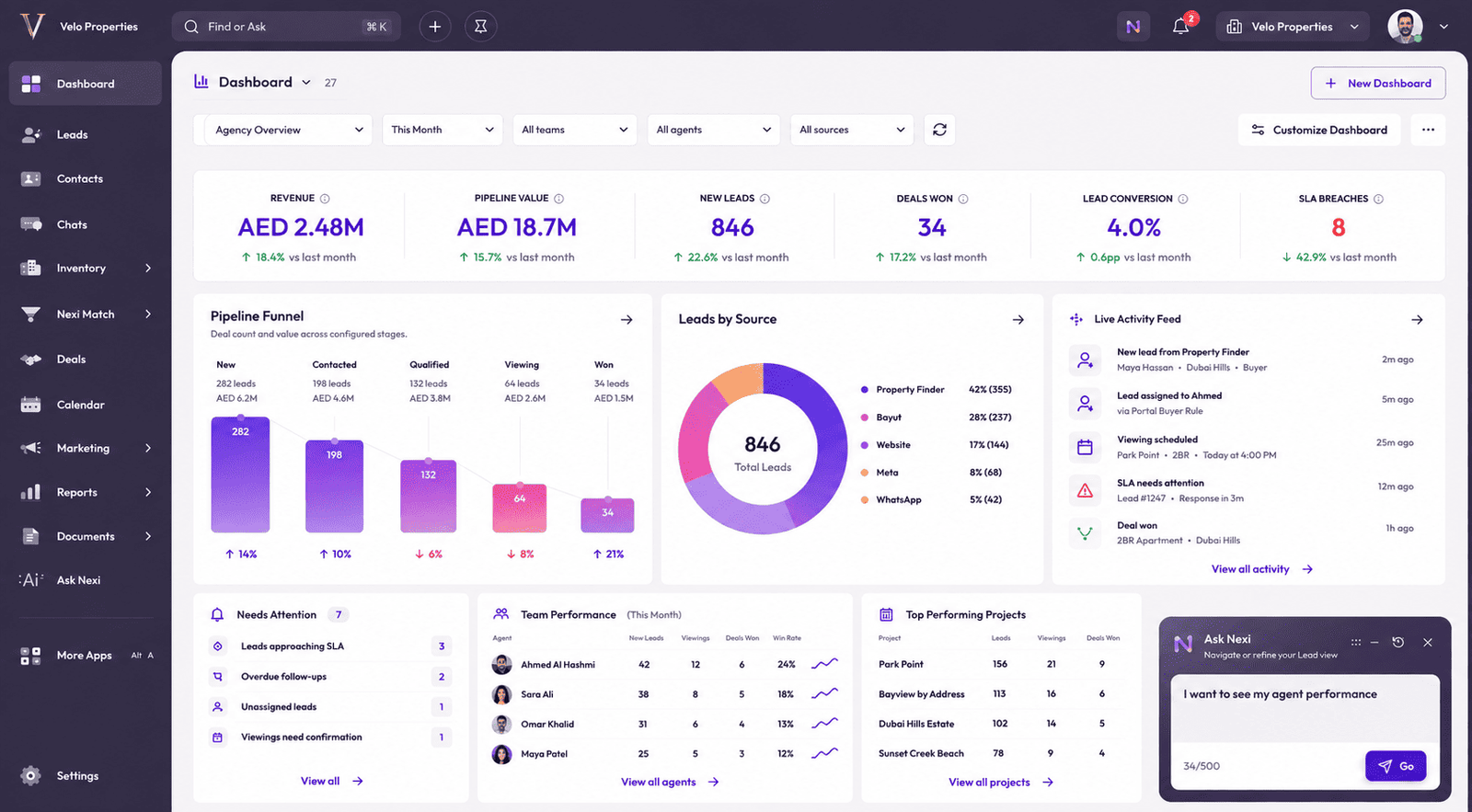
Nexi brokerage dashboard showing leads, pipeline, activity, team performance and Ask Nexi

Built for the market

Built Around How
UAE Real Estate Works.

From portal inquiries and WhatsApp conversations to off-plan inventory, sales teams and AED requirements, Nexi follows the way UAE brokerages already operate.

Property Finder
Bayut
Meta
WhatsApp
Dubizzle
Website
Leads
Requirements
Nexi Match
Viewings
Deals
Off-plan Projects
Inventory
Agents & Teams
Automations
Reports
Documents
Contracts / eSign
Payments
Commissions
DLD / RERA
Tenancy
Post-sale
NexiUAE Real Estate OS
Property FinderBayutMetaWhatsAppDubizzleWebsite
NexiUAE Real Estate OS
LeadsRequirementsNexi MatchViewingsDealsOff-plan ProjectsInventoryAgents & TeamsAutomationsReports
DocumentsContracts / eSignPaymentsCommissionsDLD / RERATenancyPost-sale

One connected journey

From Inquiry to Deal.

Watch new demand become structured, owned work without losing the source, requirement or response context along the way.

Experience the full journey
01Source
02Lead
03Assignment
04SLA
05Requirement
06Match
BayutInquiry received
New inquiry captured
Lead createdMaya Hassan · Buyer
BayutFirst message sentPipeline started
Assigned to AhmedRound Robin
ASO
Agent notified Instant
SLA startedRule-based SLA
05:0004:59
Responded within SLA
Requirement capturedfrom WhatsApp
“2BR in Dubai Hills around AED 1.8M.”
Dubai Hills2 BRAED 1.8MApartment
Properties matchedRanked by fit
Park Point 94%Collective 2.0 89%Golfville 82%
Pipeline updatedViewing
NewContactedQualifiedViewing
Deal createdDeal #D-1042
Maya+Park Point+Ahmed
AED 1.8M Won

One operating system

Your Whole Brokerage.
One Operating System.

Leads, conversations, inventory, deals, tasks, marketing, documents and reporting stay connected instead of living across disconnected tools.

Explore the platform
NexiShared context
LeadsCapture, qualify, assign and track every inquiry.
ChatsManage conversations alongside customer context.
InventoryProjects, units, listings and availability.
DealsMove opportunities through a controlled pipeline.
Nexi MatchScore requirements against suitable inventory.
AutomationsMove repeatable work forward with clear rules.
Tasks & CalendarCoordinate viewings, meetings and follow-ups.
MarketingPlan campaigns and connect outcomes to CRM data.
DocumentsKeep files and templates linked to the work.
ReportsSee performance by source, agent and pipeline.
AccountsOrganise people and companies around relationships.

Customer workspace

Every Customer Touchpoint. One Story.

A customer is more than a row in a CRM. Nexi keeps the latest inquiry, conversation, requirement, next action, ownership, response commitment and relevant properties together.
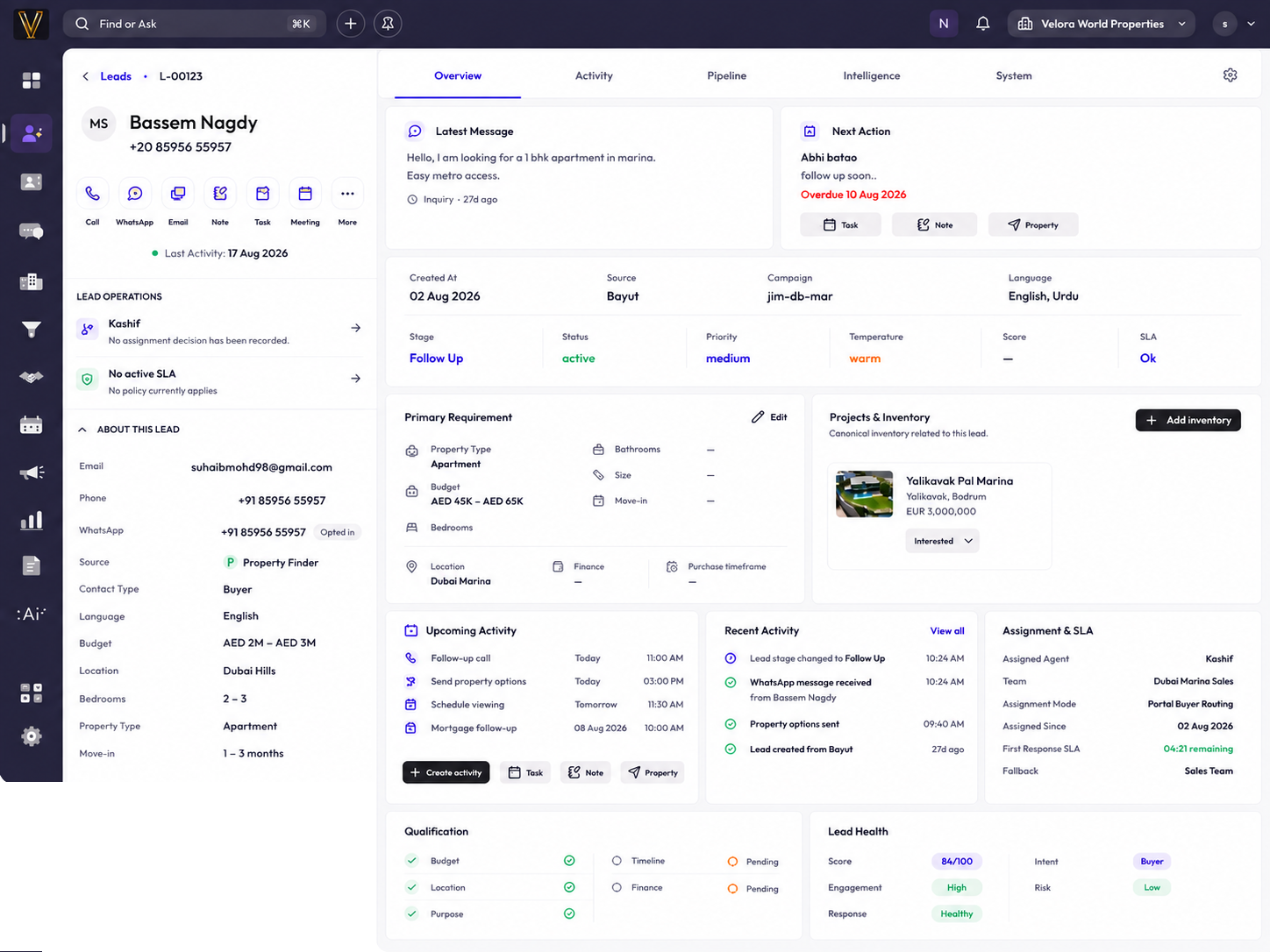
01 / 07Latest Inquiry02 / 07Conversation03 / 07Requirement04 / 07Next Action05 / 07Assignment & SLA06 / 07Activity07 / 07Matches
Nexi desktop lead workspace showing the complete customer record
Lead workspaceMaya Hassan
MH
Maya HassanBuyer · Property Finder
Active
Latest inquiry
Property FinderReceived 8 minutes ago
Conversation
Hi Maya, are you looking in Dubai Hills?Yes, ideally a two bedroom.
Requirement
Dubai Hills2 BRAED 1.5M–2M
Next action
Share matching propertiesToday · 4:00 PM
Assignment & SLA
AH
Ahmed Al HashmiPortal Buyer Routing
04:42
Activity
Inquiry receivedAssigned to AhmedWhatsApp reply sent
Matches
Park Point94%Collective 2.089%Golfville82%
More

Conversations

Chats where your customer context already lives.

Connect WhatsApp Business to Nexi and keep customer conversations alongside the Lead, requirement, properties, activities and deal context.

ChatsConversation workspaceOfficial Meta Cloud API connectedConnecting conversation context
MHMaya HassanBuyer · Dubai HillsActive lead
Earlier today
Park-Point-Payment-Plan.pdfPDF · 2.4 MB
Requirement updatedDubai Hills · 2 BRAED 1.5M–2M
Today
Write a message…
Message from Nexi

Keep conversations connected to the customer record.

Photos, videos & documents

Share property media and files in the conversation.

Templates & delivery status

Use supported WhatsApp templates and see message delivery/read state.

Connected CRM context

Conversation stays alongside requirements, properties, activities and deals.

Nexi Match

Find the Property.
Find the Buyer.

Find the right property for a buyer. Reverse it to find the right buyer for a property.

Nexi MatchBuyer requirement → properties
Buyer requirementMaya Hassan

Dubai Hills · 2 BR · Apartment
AED 1.5M–2M

Matching propertiesReasons remain visible
Park PointDubai Hills · 2 BR94/100Best fit
Maple IIIDubai Hills · 2 BR91/100
SidraDubai Hills · 2 BR86/100Review timing
Illustrative matching view using demo data

Assignment, SLA & automations

The Work Moves With the Lead.

Routing, response policies, follow-ups and fallback actions move with the inquiry while the execution path stays visible.

Configurable rulesEscalation & fallbackVisible execution path
Automation builderNew inquiry follow-upActive
TriggerNew inquiry

Lead created

ConditionRouting rule

Source and team rules

ActionAssign agent

Best available agent

ActionStart SLA

Response policy

ActionCreate follow-up

Task due today

ActionNotify agent

Workspace notification

ConditionCheck response

Response status

FallbackEscalate if needed

Manager attention

Follow-up createdAgent notifiedFallback ready

Nexi AI

AI That Understands Your Brokerage.

Nexi AI works with the same leads, conversations, requirements, inventory, tasks, SLA and deals your team already works with.

ListeningWhich leads need my attention?
Lead WorkspaceMaya Hassan · BuyerLive context
LeadsChatsRequirementsInventoryMatchTasksDealsSLA
Latest inquiryMeta · 8 min ago
RequirementDubai Hills · 2BR
AssignmentAhmed Al Hashmi
Response SLAApproaching · 11m
Team performanceThis month
AHAhmed6 wonSASara5 wonOMOmar3 won
Nexi Match4 suitable properties
Recent activityWhatsApp · 24 min ago
Context-aware

Understands the CRM record and surrounding activity.

Permission-aware

Works within the access available to the current user.

Explainable

Can show the context behind recommendations and operational decisions.

Action-ready

Can guide users toward the next relevant CRM action.

Insights

See What’s Working.
Know What Needs Attention.

Understand where leads come from, how quickly teams respond, how the pipeline is moving, which agents and properties are performing, and what needs attention now.

InsightsBrokerage overviewperformance view · illustrative workspace
PerformanceAcquisition to outcome
Lead sourcesPipelineAgent performanceDeals
Lead capturedContactedQualifiedViewingOutcome
Property portalsMetaWebsite / APIOther sources
OperationsWork requiring attention
SLA risk
Overdue follow-ups
Unassigned leads
Stalled opportunities
IntelligenceSignals in context
Lead qualityWorkspace signal
Buyer intentWorkspace signal
Match performanceWorkspace signal
PatternsPattern view

Every role in sync

Built for the Teams Behind Every Deal.

Owners, managers, agents, operations and marketing teams see the context and controls relevant to their role, inside the same operating system.

Owner workspaceBrokerage overviewLive role context
01Pipeline health
02Team performance
03Revenue context

Integrations

Connected to the tools your brokerage already uses

Bring lead sources, conversations, calendars and property platforms into one connected Nexi workspace.

View all integrations
NexiConnected workspace

Property Portals

Lead & Communication Channels

Calendars

Connection availability and capabilities vary by provider, account access and workspace configuration. Provider names and logos identify third-party services only and do not imply partnership, certification or endorsement.

Always evolving

Built to Keep Evolving.

Nexi continues to grow across workflows, integrations, automation, intelligence and the tools brokerages use every day.

Nexi platformConnected system
Nexi
LeadsChatsAutomationsIntegrationsReports

Security & control

Your Business. Your Rules. Your Data.

Nexi supports controlled access, separated workspaces and reviewable operational history without obscuring how the system reached a decision.

Workspace separationCustomer workspaces stay separated within Nexi's application architecture.
Roles & permissionsAccess follows the responsibilities and controls configured by the brokerage.
Controlled integrationsProvider connections use governed configuration and access flows.
Operational historyRelevant decisions and activity remain available for accountable review.
Learn about Security

See Nexi in your brokerage

See Nexi in Your Brokerage.

Bring your lead sources, team, inventory and workflow into one connected conversation.